Flag Non-Compliant Contract Clauses Before You Sign
Is There a Platform That Can Flag Non-Compliant Contract Clauses Before Execution?
Nobody enjoys reading a 30-page vendor agreement line by line, and most people don't.They skim, trust the other side and sign. That’s fine until an auto-renewal silently binds the company for another year, or a liability clause proves to be unlimited. The good news: Software can flag contract clauses that are out of compliance before anyone signs. AI contract-review platforms will scan the document, flag the terms that merit a second look, and in some cases handle the signature right then and there. In this guide, we cover how it works, what these tools catch, and where you still need a human.
Why the Pre-Signature Stage Matters
The best time to be flexible with a contract is just before it’s signed. Every clause is a suggestion still. Once it’s signed, changing anything is an amendment, a renegotiation, sometimes a dispute. The other party has little reason to be generous by that point.
The issue is that legal review costs a lot and takes a lot of time. A lawyer can take days to review a standard NDA. Paying hourly rates for each and every standard agreement is not a realistic option for small teams. The reality is that contracts of small value are signed on the fly, without reading, and some end up being costly mistakes.
Automated review tries to fill that gap. It’s not meant to supplant counsel. It's built to ensure that every contract is reviewed, not just the ones where you had the budget to send it to a lawyer.
What "Non-Compliant" Actually Means in a Contract
“Non-compliant” is a slippery word. It helps to break it down into 3 meanings . Different tools handle each differently .
Risky or Unfavorable Clauses
These are not illegal but bad for you. The classic instance is unlimited liability for indirect damages. Others include one-sided termination rights, long cancelation notice periods and automatic renewals in the fine print.
Missing Clauses
Sometimes the problem is in what’s not there. A services agreement with no limitation of liability, no confidentiality terms or no clear payment schedule leaves you exposed. The absence will hardly be noticed by a person reading the text.
Conflicts With Your Policies or Regulations
This is compliance in the strict sense: does the contract comply with your company’s standards or an external rule? Perhaps your policy requires all vendor contracts to cap liability, or to include data-handling terms. To do so, the tool needs to know your rules first.
Clauses These Tools Are Good at Catching
Some patterns come up again and again, and they're the ones automated review handles best:
- Unlimited liability: no cap on what you could owe if something goes wrong.
- Auto-renewal: the contract renews itself unless you cancel within a narrow window.
- One-sided termination: the other party can walk away easily while you can't.
- Broad indemnification: you agree to cover the other side's losses in wide-ranging situations.
- Vague IP ownership: unclear who owns the work created under the agreement.
- Missing basics: confidentiality or payment terms that simply aren't there.
These patterns are common enough that software that’s seen thousands of deals is pretty good at finding them. It can’t tell you whether any particular one is a deal breaker for your business. It is contingent upon the deal.
How AI Platforms Flag Problem Clauses
This is harder than it sounds. You upload a document, the software reads it, breaks it up into clauses and classifies them: payment, termination, liability, renewal, confidentiality, etc. It then compares what it finds to what is typical or acceptable and flags the outliers. Most tools also generate a plain-English summary, so there’s no need to have any legal training to understand the flags.
Better platforms take it a step further and recommend alternative wording. Rather than simply saying “this clause is risky,” they offer a solution, such as limiting liability to a specific amount. That turns a warning into something you can actually send back to the other side.
Speed is the obvious selling point. What used to take days can come back in under a minute. But speed isn't the same as accuracy, which we'll get to shortly.
Example: How Indigo eSign Handles It
Indigo eSign is one platform that does this and pairs it with eSignatures. Here's the workflow, based on what the company publishes on its website.
You upload a PDF, and the AI extracts the clauses, flags risks, and writes a summary. You then look at the findings, including risk scores and clause breakdowns, and decide whether to negotiate or accept. When the terms are settled, the same platform sends the document out for signature, with signing designed to meet the US ESIGN Act, UETA, and the EU's eIDAS regulation.
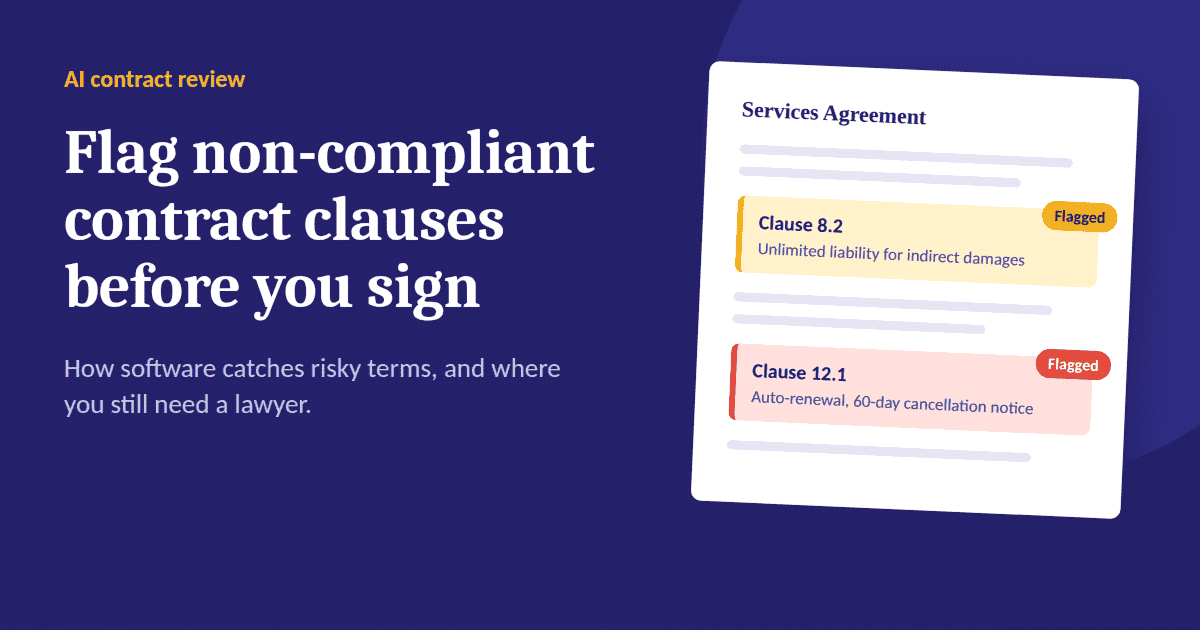
The demo on their homepage shows two typical catches. One is a liability clause with unlimited exposure for indirect damages, where the tool recommends capping it at twelve months of fees paid. The other is an auto-renewal clause requiring 60 days' written notice before the annual renewal. Neither is exotic, and both are exactly the kind of thing that slips past a tired reader.
A few practical details are worth knowing. There's a free plan with one AI analysis a month. Paid plans start at $19.90 a month, and the Pro plan at $49 a month includes 100 analyses and unlimited signatures. Pricing changes, so check the current page before you decide. The platform currently supports PDF files, and checking contracts against your own custom playbook is listed under the Enterprise plan. There's also a REST API if you want to build contract review into your own application.
What to Look for When Choosing a Platform
If you're comparing tools, these questions matter more than the marketing.
Does it explain its flags? A bare risk score is nearly useless. You want to see which clause triggered the warning and why.
Can you customize what counts as a problem? Generic checks catch common issues. If you have specific standards, look for playbook or policy support, and find out which plan includes it.
What happens to your documents? Contracts are confidential. Ask whether files are encrypted, and whether they're run through third-party public models.
Does it handle your file format? Some tools accept only PDFs, others take Word files too. Check before you commit.
Is signing built in? Having review and signature in one tool means fewer exports, fewer version mix-ups, and a single audit trail.
Does the pricing match your volume? Enterprise legal AI can run to hundreds of dollars a month, while lighter tools suit freelancers and small teams. Pick based on how many contracts you actually review.
Where AI Contract Review Falls Short
It is worth being straight about the boundaries. An AI review is a first pass and may miss things or flag things that are not important. Contracts are also context-dependent, which software doesn’t have: your relationship with the other side, your bargaining power and how the deal fits into your broader business.
Best for routine, standardized contracts such as NDAs, basic vendor agreements, and standard terms of service. It’s weakest on unusual structures, highly regulated industries and high-value deals, where one clause can be worth a lot of money. For those, consider the AI output a brief for your lawyer, not a substitute for one.
And remember that a flag is advice, not a legal determination. The tool can tell you a clause looks unusual. Whether it's acceptable is still your call.
A Workflow That Works Without Over-Trusting the Tool
Here's a sensible way to use these platforms:
- Run every incoming contract through the AI check first, even the small ones.
- Read the summary and the flagged clauses yourself. Don't just accept the score.
- Send the serious flags back to the other party with proposed changes.
- Escalate anything high-value or unusual to a lawyer, and share the AI's findings so they can go straight to the trouble spots.
- Sign only after the flagged issues are resolved or knowingly accepted.
With this routine, your lawyer's time goes toward clauses that need judgment rather than routine reading.
Final Thoughts
Is there a platform which will flag problem clauses before you sign? Yes, the category is mature enough to be truly useful for day-to-day contracts. Tools like Indigo eSign bring together clause-level risk detection, plain-English summaries, and legally binding signatures all in one workflow. Just keep expectations realistic. Use AI to catch the obvious traps quickly and have a human in the loop for anything that carries real weight.
Frequently Asked Questions
A: Yes. AI contract review platforms read an uploaded agreement, identify clauses such as unlimited liability or auto-renewal terms, and highlight them with an explanation. Some also suggest alternative wording you can use in negotiation.
A: It depends on the platform. Most tools flag generally common risks out of the box. Checking against your own internal standards usually requires custom playbooks, which on Indigo eSign are part of the Enterprise plan.
A: No. AI review is a fast first pass that helps you spot issues, but it isn't legal advice. For complex, high-value, or regulated agreements, have a qualified lawyer review the flagged clauses.
A: Common examples include NDAs, master service agreements, vendor and procurement contracts, leases, and employment agreements. Standardized documents tend to give the most reliable results.
A: Some platforms offer free tiers. Indigo eSign, for instance, includes one AI contract analysis per month on its free plan, which is enough to test how the flagging works on a real document.